
Lifestyle
Your iPhone Is Your Wallet Now: HLB Cardholders Can Get RM30 Cashback With Apple Pay


Ever had to scramble for your wallet with your hands full of shopping bags? Well, if you own an iPhone or Apple Watch, there’s a much easier way to pay for everyday purchases.
With Apple Pay, you can add your Hong Leong Bank (HLB) Visa Credit or Debit Card to Apple Wallet and pay effortlessly with your iPhone, Apple Watch, iPad, and Mac!
Plus, you could even get RM30 Cashback just by making everyday purchases with your HLB Card on Apple Pay. Here’s how to get started and earn cashback:
Your next 3 purchases could earn you RM30 cashback

Here’s the fun part: from now until 26 November 2026, eligible first-time HLB Visa Card users on Apple Pay can get RM30 Cashback just by making everyday purchases. To qualify, simply:
- Add your HLB Visa Credit or Debit Card to Apple Pay for the first time.
- Make three RM50 minimum separate purchases each using Apple Pay.
- Complete all three transactions within the same promotion week.
Just by spending on groceries, petrol, and friend or family lunches, you can easily fulfil the weekly minimum spending requirement. Just remember to use the same HLB Visa Card for all three transactions, with each purchase amounting to at least RM50.

The best part? There’s no need to fill out any registration forms, as HLB will automatically track your eligible transactions. If you’re selected, the RM30 Cashback will be credited to your principal card account within 60 days after the promotion period ends.
Just keep in mind that each eligible cardholder can only receive the cashback once. The promotion also has a total cashback pool of RM500,000, with rewards given on a first-come, first-served basis.
Get your HLB Visa Card on Apple Wallet in just a few steps

The good news is, setting up Apple Pay with your HLB card is SO EASY! All you need to do is add your eligible HLB Visa Credit or Debit Card to Apple Wallet. You can do this either in the Wallet app or the HLB Connect app, and it only takes a few steps.
Let’s walk you through it:
Option 1: Add your card via Apple Wallet
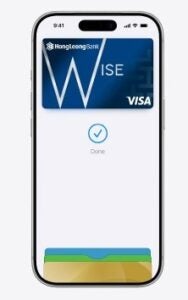
- Open the Apple Wallet app on your iPhone and tap the ‘+’ icon in the top-right corner.
- Select ‘Debit or Credit Card’ and follow the on-screen instructions.
- You can either scan your physical HLB Visa Card, use NFC, or enter your card details manually.
- Accept HLB’s Terms & Conditions and complete the verification process.
Option 2: Add your card via HLB Connect
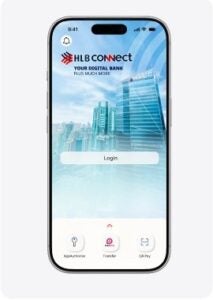
- Log in to your HLB Connect app using your password or biometric authentication.
- Swipe left to find the Credit Card page.
- Select the HLB Visa Card you’d like to add and tap ‘Add to Apple Wallet’.
- Choose which Apple device you want to add your card to, then accept the Terms & Conditions.
- Once your card has been successfully verified, you’ll receive a confirmation via an in-app notification or email.
And just like that, you’re all set! Your HLB Visa Card is now ready to use with Apple Pay. You can even add the same card to up to 10 Apple devices, so you can make payments using whichever device is most convenient.
Pay for your everyday purchases with just a tap
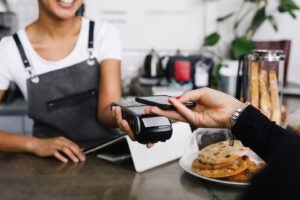
Now that your card is set up, you’re ready to pay with your HLB Visa Credit or Debit Card via Apple Pay whenever you’re out and about. Here’s how:
- On your iPhone: Double-click the side button, authenticate with Face ID or your passcode, then hold the top of your phone near the payment terminal.
- On your Apple Watch: Double-click the side button and hold your watch display near the terminal. You’ll feel a gentle tap and hear a beep once your payment is successful.
Apple Pay also works for online shopping and in-app purchases, so you can check out without manually entering your card details every time. Simply verify your purchase with Face ID or Touch ID, and you’re good to go.
Make everyday payments easier with HLB and Apple Pay
Haven’t added your HLB Visa Credit or Debit Card to Apple Wallet yet? Add it via Apple Wallet or HLB Connect today and start making three RM50 purchases in a week to get your RM30 Cashback.
For more details about Apple Pay and the promotion, including the full terms and conditions, visit HLB’s website, Instagram, and Facebook!



Experts: Even If Hackers Attack Banks, M’sians’ Outstanding Loans Won’t Simply Disappear
Professor Dr Zubaile Abdullah, a senior researcher at the Centre for Cybersecurity and Data Intelligence (CCDI), Universiti Tun Hussein Onn...

NACSA Confirms Global Microsoft 365 Outage is Not a Cyberattack, Urges M’sian Agencies to Stay Vigilant
Following the massive global Microsoft 365 outage that disrupted productivity tools like Outlook and Teams for tens of thousands of...


Best Work Perk Ever? Logitech Gives 7,000 Employees A Day Off for First-Ever Gaming Day Ahead of GTA VI Release
Logitech is making headlines after announcing its first-ever company-wide gaming day on 19 November, giving employees a dedicated day off...


Anwar Ibrahim Once Again Named Among World’s 500 Most Influential Muslims, Ranks 13th on 2027 List!
Datuk Seri Anwar Ibrahim has once again been recognised as one of the world’s 500 most influential Muslims, earning a...


Animal Group Urges Probe Into Viral Video of Alleged Former Teacher Tying Cat by Its Neck to Pickup Truck in Johor
The Stray Animals Malaysia Association (SAFM) has spoken up after a video showing a man driving a pickup truck with...


Kepong Machete Attack Suspect Overstayed in M’sia Since 2020, Neighbour Says He Was Distressed After GF Left Him
Following the shocking incident on Wednesday (11 November) where a Royal Malaysia Police (PDRM) officer had his right wrist severed...


Why Can’t Malaysian Police Just Shoot Armed Suspects? Here’s What The Law Says
Following the machete attack in Kepong that left a Malaysian police officer with a severed wrist, one question has been...


4 Alleged M’sian Tourists Accused of Taking Photos Inside a Korean Bathhouse, Police Called to Investigate
South Korean police were called on 10 November after a group of women, believed to be Malaysian, were allegedly caught...


More Deals, More Savings: foodpanda’s Pau-Pau Recommendation Make Everyday Groceries Shopping More Rewarding
As Malaysians continue to navigate rising cost-of-living pressures, finding ways to better manage household budgets has become increasingly important. Following...


11 Top-Voted Local Creators to Represent Malaysia on the Regional Stage at TikTok Awards Southeast Asia 2026
Following a nationwide public voting phase that saw over 5.3 million votes cast for Malaysia’s most iconic and rising creators,...


EMKAY Group Celebrates 43rd Anniversary, Extends Merdeka Dari Sewa 2 with Cash Rebates of Up to RM310k
EMKAY Group recently announced the extension of the Merdeka Dari Sewa 2 campaign until 31 December 2026. The announcement follows...

“Do you think I’m scared of you?” – M’sian Actress Gets Into Public Spat With Aunty During Podcast at Cyberjaya Eatery

PDRM Officer’s Wrist Severed in Kepong Machete Attack, Suspect Believed to Be Foreign National Shot Dead by Police
Kepong Machete Attack Suspect Overstayed in M’sia Since 2020, Neighbour Says He Was Distressed After GF Left Him

“I’ve stepped down, what about you?” – Anthony Loke Challenges BN MPs Who Keep Criticising PMX & Unity Govt
Why Can’t Malaysian Police Just Shoot Armed Suspects? Here’s What The Law Says






-
News9 hours ago
Kepong Machete Attack Suspect Overstayed in M’sia Since 2020, Neighbour Says He Was Distressed After GF Left Him
-

 Lifestyle4 hours ago
Is Today “Cursed?” A Real 1960 Scientific Paper Predicted Friday, Nov 13, 2026 Would Be the End of the World
-
News3 hours ago
Experts: Even If Hackers Attack Banks, M’sians’ Outstanding Loans Won’t Simply Disappear
-
News8 hours ago
Animal Group Urges Probe Into Viral Video of Alleged Former Teacher Tying Cat by Its Neck to Pickup Truck in Johor